A1339 - Magic Trackpad 1
It Fits in Perfectly
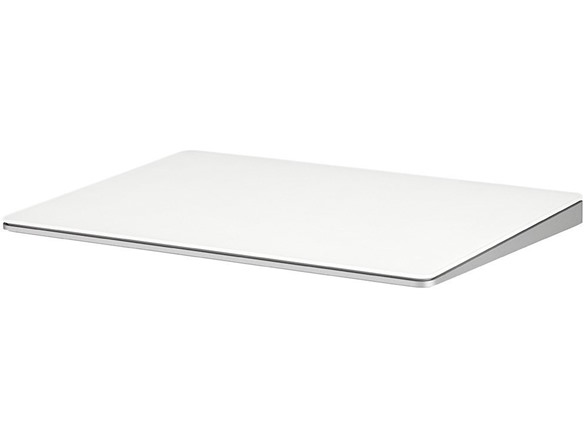
Magic Trackpad features the same sculpted aluminum design as the Apple Wireless Keyboard, and side by side the two sit flush at the same angle and height. Go from typing to geturing in one motion, or do both at the same time. How perfect is that?
Get in Touch with Your Desktop
The entire surface of Magic Trackpad is one large button, so you can click and double-click anywhere. Magic Trackpad also supports a full set of gestures, including two-finger scrolling, pinching to zoom, rotating with your fingertips, three-finger swiping, and activating Exposé or switching.
Why Should Notebooks Have All The Fun?
Desktop users, your time has come. The new Magic Trackpad is one of the first Multi-Touch trackpad designed to work with your Mac desktop computer. It uses the same Multi-Touch technology you love on the MacBook Pro. Magic Trackpad connects to your Mac via Bluetooth wireless technology. Use it in place of a mouse or in conjunction with one on any Mac computer - even a notebook.
Key Features:
- Magic Trackpad gives you a whole new way to control what’s on your Mac desktop computer.
- Swiping through pages on screen is just like flipping through pages in a magazine.
- Inertial scrolling senses the momentum in your fingers as you move up and down a page.
- Nearly 80 percent larger than the built-in trackpad on the MacBook Pro, giving you plenty of room to perform gestures.
- Magic Trackpad connects to your Mac via Bluetooth wireless technology.
-------------------------------------------------------------------------
A1535 - Magic Trackpad 2
Redesigned and rechargeable, Magic Trackpad 2 includes a built-in battery and brings Force Touch to the desktop for the first time. Four force sensors underneath the trackpad surface allow you to click anywhere, and detect subtle differences in the amount of pressure you apply, bringing increased functionality to your fingertips and enabling a deeper connection to your content.
Magic Trackpad 2 also features an edge-to-edge glass surface area that is nearly 30 per cent larger than the previous trackpad. This design, along with a lower profile, makes scrolling and swiping through your favorite content more productive and comfortable than ever. Magic Trackpad 2 pairs automatically with your Mac, so you can get to work right away.
Key Features:
- Completely redesigned, the new Magic Trackpad 2 features a built-in battery, Force Touch, a much larger surface, and pairs automatically with your Mac.Built-In Rechargeable Battery
- Lots of workspace -- the edge-to-edge glass surface area of the Magic Trackpad 2 is nearly 30 percent larger than the previous Magic Trackpad.Connector: Lightning
- Long-lasting power: your Magic Trackpad 2 stays powered up for about 1 month after every charge and system requirement is bluetooth 4.0-enabled Mac computer with OS X v10.11 or later
Shipping Note: Shipping to Alaska, Hawaii, P.O. Boxes, and APO addresses is not available for this item
Warranty: 90 Day Woot Limited Warranty