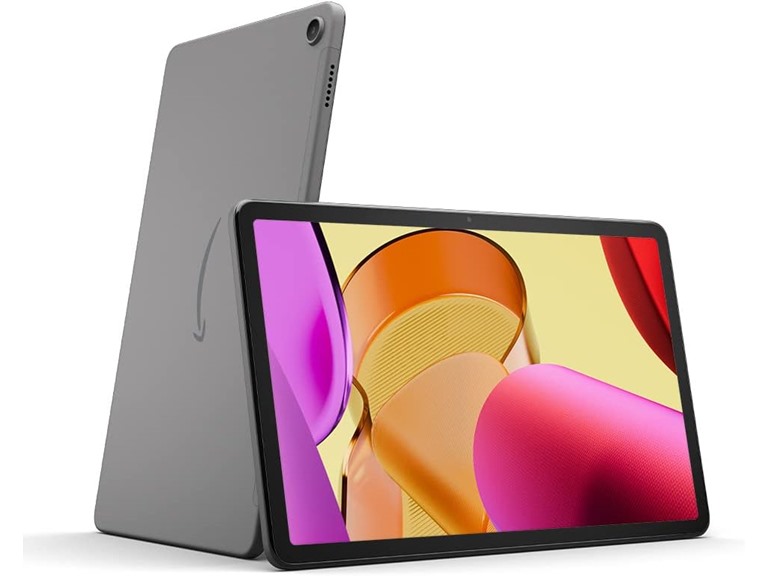
Amazon Fire Max 11 Tablet (2023 Model)
$139.99
$229
39% off
Reference Price
Condition: New
Screen Size: 11"
Color: Gray
Top positive review
339 people found this helpful
Great productivity device
By Ski9 on Reviewed in the United States on July 23, 2023
UPDATE: I've been using this Fire for about a year (got it on Prime Day 2023) and I still like it a lot. It is a bit heavy for relaxed reading, so I also got the Fire 10 HD (13th gen) this year, 2024 Prime Day. Indeed the 10 is significantly lighter even thought the size difference between the two is fairly small (same width but 11 is taller when in portrait, so it is wider screen in landscape). It is nice to have both. I will keep using the 11 with the keyboard it came bundled with and I will not get a keyboard for the 10. The keyboard is awesome and having the 11 be wider than the 10 allows the keyboard to be very comfortable. So if you touch-type, and want the attached keyboard, I recommend the 11 over the 10. I've used the keyboard extensively and it really is great (other than accidentally touching the touch pad occasionally, and unintentionally change my typing location). Also, I noticed that the 10 is annoyingly slower than the 11 when rendering all the icons on my home screen. Occasionally the icons disappear and you have to wait for them to reappear. It is only a couple of seconds but I don't recall ever seeing that on a "regular android" device, so it is a Fire OS issue that is more apparent with the slower 10. But the main reason I decided to write an update is the SD card issue that some other reviewers mentioned. I thought others had issues because they set up the card as "internal" which is essentially (but not quite) like having a bigger internal space for everything including apps. This is dangerous and there is a reason why you can no longer do this with newer versions of Android. So unless you have a zillion apps and really need bigger internal space because of your apps, you really should set up the card as Portable Memory instead (no apps on the card, only media and other files, etc.). Then you can decide what types of files to put there AND you can safely remove the card and access it on another device like your laptop (that's why it is called "portable"). You can choose to have the Kindle app, Prime Movies, etc download to the card. Most people need expanded memory for media, so this makes sense, and again it is safer. You also have good control over what gets stored on an SD card vs internal storage. But, setting up the card as Internal isn't the reason people had issues, because today for the first time I had the issue that others complained about, which is that my card supposedly unmounted and the Fire asked me to re-format. (This would be a bigger problem if I had set it up as "Internal" rather than "Portable"!!). I shut down the Fire, removed the card, and mounted it in Windows. Windows told me there was a problem with the card and I should scan and fix it. I did. Windows showed it as then fine, no further issues. And I had no trouble copying out all the folders from the card to Windows. Returning the card to the Fire still showed the screen for formatting the card, but I'm wondering if this is because the Fire tends to show screens that were on when you shut down. Or else the card was somehow marked as needing a format. The super weird thing, is, when I said to format as Portable Memory, it did so without removing anything. Doesn't formatting a card mean erasing it (or showing it as blank) so you start over with it fresh ?!?!? I was going to format it however Fire likes to format, and then return the original folders. But I did not need to copy back anything. It is working fine now. So apparently it would have re-formatted only if I had decided to swap from using it as "portable" to "internal." Probably every time you unmount ("eject") the card, you will get this message, and it won't really erase everything and reformat, unless you opt to change how you want to use the card. So all is okay with the card, but this situation should not have happened. It probably happened because some function was writing to the card and another function (an update??) dismounted it, thus interrupting the write. This is why Windows had to fix it. So, I think the card issue almost certainly has nothing to do with the particular card, so others' comments are correct about that. (I've been using a new high-quality Samsung Pro Plus card, overkill for a Fire tablet but it was on sale). When the card issue surfaced, I was trying to do some updates from the Appstore and it seemed frozen. (There is still a problem with the Appstore!). So the Fire was not in a good state. It may be a good idea to reboot it occasionally once in a while (I probably hadn't rebooted for about a month). I was also thinking maybe it was trying to update and that broke its normal functionality. Could be. My biggest suspicion. It is on Fire OS 8.3.2.4, from July 3, 2024. I checked for updates even though it showed as last checking today, and it said to tap to install an update, but when I did, everything froze. I eventually went back to the updater, and now it said I have 1 update (rather than a bunch of gibberish that suggested some pieces were still downloading, and with a broken button for installing, as initially happened). Now I was able to install the update, and when I re-checked for updates, it showed "no updates found," and the Check Now button reappeared as normal. So all seems fine. Other than the fact that my OS still shows as 8.3.2.4. And it still shows it as being from July 3 (today is Aug 7). And I did not get the usual message that my system has updated. It was a secret undocumented thing, or the old update re-installed (why??). Perhaps it was not a Fire OS update but an update of some other built-in component (like the Apstore, or some such thing). The Appstore still seems hung on the page where I update apps. The other parts of it work. It is an issue with the app, because F-Droid can install and update just fine. And my new Fire 10 also works fine, so it is not the server for the Appstore. I'm now thinking it got a corrupted (interrupted?) update and won't work until Amazon has a newer update that I can install on top of it. Amazon, if you are listening: please please be normal about updates. Let your users know there is an update and let them pick when to do the update. If control-freak Apple can do this, you can, too. I do not want to be using my device while it is trying to update (or shutting it down to remove a corrupted card...). That's just asking for trouble. I want to have it plugged in and keep my hands off it for a while. This is a problem with other Amazon devices as well. Okay, you're gonna force an update whether I like it or not, but please, if you don't want to cause a lot of grief, just let people have some control (and awareness!!!!!) when the device needs to be updated. My guess is that even when there is only a minor update (as seems to have been the case for me), the Kindle is not fully functional but pretends to be, and since it is not fully functional (it quits some processes), some unexpected quits will cause corruptions/crashes/SD card issues..... But otherwise it is a good device. Truly. I'm still happy to have it. I love the whale background :-) Initial Review: I got the productivity bundle and I am super pleased. I needed something to take notes with in classes, that also had a touch screen for drawing, and this is great for that. (Amazon Appstore has OneNote and Squid and both are great for notes with this.) In my experience it DOES matter which app you use with the pen because a paint app I tried worked but was slow (so I blame the app, since OneNote and Squid are fine). There is also a fairly new open source app called Saber that seems great (I still need to experiment with that one -- available on F-Droid). I'm thinking that some of the professional reviews (on other web sites) got an early or different version of the pen because the harsh criticisms of it do not match my experience. It works great. This is my 2nd Fire tablet, and I like it so much better than my first one, Fire 8 HD from 2017. I wasn't unhappy with the old tablet when I got it (because I got it on sale for a great price) but I just almost never used it because the screen was so unpleasant and stressful to look at, plus the device was annoyingly slow. Not so with this new tablet -- I am very pleased with the screen quality, and the speed is good for how I'm using it. The pen and keyboard are truly awesome. I wasn't sure at first whether I liked the aspect ratio/shape of the tablet but actually it makes sense. The longer shape allows for nearly full-sized key spacing on the keyboard while not causing the tablet to be unnecessarily large and heavy, as it would be with the iPad's aspect ratio. Someone said they prefer the snap-in clamshell keyboard that is available for the 10, but I much prefer this thin-and-light keyboard (didn't have the 10 but considered it and looked at pics of its keyboard). It is super easy and fast to pull off and snap on the keyboard and it does not need batteries. At home (where I have "real" laptops) I use the tablet mostly without the keyboard, and half of the keyboard case stays on it, protecting the back and the camera, and giving the tablet a nice non-slip feel, plus I can use the fold-out stand. I don't use it on my lap at school, and at home I use a lap desk so I don't mind that I can't put it directly in my lap while typing. Really, I have no complaints at all about this setup. Perfect. Well, maybe I can complain a little about Fire OS but it is mostly okay. I would hate it for a phone but it is fine for a tablet. And it is much improved over what I had on my old Fire, especially the settings (I like to have control and info). I put Google Play on my previous Fire but I'm not sure I will do so on this one. I mean I have an Android phone that has things I'd like from the Play store, like my calculator collection and bank apps and whatnot. I don't need to replicate that on this tablet. I've installed F-Droid so I can still easily put a bunch of nice apps on it. I have a Linux terminal app (Termux) and will probably install a small Linux distro with desktop which will further expand the usability. Plus I have a Microsoft 360 subscription from work and it is nice to have an app for that on this tablet too. It has the most critical work apps like Zoom and Teams and Office and Outlook. So it already has what I really need on a tablet. Oh, and Kindle, of course. I think in the past it was almost necessary to side-load Google Play but the Amazon Appstore now has my most critical apps, at least for a tablet. (Yea, it generally is not great and not well maintained, with tons of outdated apps.) Don't be mad at Amazon about Google Play Store, YouTube, etc. It is a Google policy. Google does not want others to take the open source piece of Android and build their own thing on top of it, with no control from Google. There are penalties for doing that. And Amazon couldn't sell its media to you directly on regular Android, so it kind of has to make a separate OS. This is your tradeoff for getting a subsidized tablet. I'm poor so I will accept the tradeoff, especially for a tablet as nice as this one. I paid to get rid of the ads, and I do that on every Kindle or Fire (I value discounts a lot, but aesthetics even more) and now this tablet is a pleasure to use. And soooo much less expensive than a similar setup would have been from Apple.
Top critical review
500 people found this helpful
Great as a Kindle ereader, but very limited functionality as a tablet. Alexa no longer works.
By Sandra Limpert on Reviewed in the United States on November 16, 2024
I've had the Fire Tablet Max for several months now. Initially, I really loved it. I wanted an ebook reader with a large enough screen to read my Kindle books, plus I wanted the functionality of having a Personal Assistant. Plus, I wanted something I could go online with. At first, the Fire Max 11 provided, well, 2.5 of the 3. As an ebook reader, it's great. With the larger screen, I can easily read books from my Kindle library, so I'm very happy with that. I can go online BUT the Fire Max 11, like all Amazon tablets, uses only Amazon Silk browser and only apps from the Amazon App Store. Many apps I would like to use are not available, like Dropbox, Adobe Acrobat (to read pdf's), Internet security, and many othes. And while it has Bluetooth, I've thus far not been able to pair my laptop with my Fire tablet. My computer will pair and connect but the Fire Max Tablet will NOT, even when the "numbers" match on my computer and tablet. So there's no way to share files except with the USB. I haven't tried that yet, so can't speak to whether it works or not. However, because most of the files I want to view on the Fire Max 11 tablet are pdf files, there's no way to read them without a PDF viewer. So, that's a downside, as well as the limited apps from the Amazon app store. Also, there's no way to add an antivirus or firewall or adblockers, either. So going online is extremely limited without the security one would like to have. Finally, Amazon Alexa. Initially, she was a godsend. I could be reading an article on the NY Times or Washington Post app (both of which are available in the app store), ask Alexa a definition of a word, and she would give it, all while my Fire Max 11 stayed on the article screen, which provided a streamless reading experience. Since I could choose to have Alexa respond even when the device is locked, I could wake up in the morning and ask her the time, the temp/weather, and she would respond immediately. I could set reminders and alarms and she would give me my reminders even when I wasn't using the Fire Max 11 tablet and the screen was locked. The same with alarms. So if you wanted to set an alarm for each morning, that worked quite well. The only issue I had was that for some unfathomable reason, Amazon designed the cover for the Fire Max 11 to actually cover the speakers, so that the sound is greatly reduced and sometimes hard to hear or even miss. The cover should open and close on opposite sides to work well with the speakers. However, since Alexa's latest update a few days ago, all that functionality is gone. Frankly, I'd fire the tech team that came up with this update. I've come to the conclusion that Amazon intends to phase out having Alexa function as a personal assistant on the Amazon Fire tablets, much as Microsoft Windows phased out Cortana from functioning as a personal assistant in Windows (a big mistake, imo). The first thing I noticed after the update is that when I spoke Alexa's name, a textbox, much like the one you'd see on your phone if sending a text or using Messenger to send a message, pops up. So, if I'm reading an article now on the Washington Post, NYTimes, etc., and ask Alexa for a word definition or who a person mentioned in the article is, the screen reverts to Alexa's text screen immediately. Their customer care team says that's so we can "see what we say and how Alexa responds" - which I think is idiotic. However, since the screen leaves the news app, in order to get back to the article I was reading, I have to close out Alexa's "new" text screen, go back to the home screen on the tablet, select the news app again, and go back to the article I was reading. WAY TOO MUCH hassle, does NOT make for a seamless reading experience, and frankly, it's just as fast to use an old-fashioned dictionary. So that functionality is lost. Perhaps more importantly, Alexa no longer works when the device is locked. I don't know about you, but I don't use my tablet 24/7. There are times during the day when the screen is inactive or when the cover is closed. Since I want to protect the screen on my tablet from spills, accidental falls or something falling on it, and prevent cracking or breaking, or getting liquid from say, coffee or water on it, I close it when not in use. Closing it automatically locks the device. Not sure if it used to in the beginning, because Alexa would still work back then, even with the cover closed, but it does now. Also, the device automatically locks after a period of time - which I can set at certain increments between 5 min and 30 minutes. There is no option not to lock the device at all after a period of inactivity. And why would I not want to have that security? First of all, to keep the Fire Tablet Max always active, would take up alot of battery power. That means I'd have to keep it plugged in all the time or be constantly recharging it, which wears down the battery. And the purpose of a tablet is to have a mobile device, so keeping it plugged it makes it more difficult to use, especially because the charging cord is less than 3 ft long. I'd say more like 24 -28 inches. So, that's not really feasible. And again, probably not good for the battery. However, since Alexa no longer responds from the lockscreen, it's not just that she doesn't respond to questions, but the reminders and alarms no longer work now, either, unless the device is active and I'm using it. That rather defeats the purpose, since if I set an alarm to wake me up, I'm sleeping and so not using my Amazon Fire Max 11 tablet - meaning it's locked and the alarm won't work. If I set a reminder for a birthday, to take out the garbage, a doctor's appt or whatever, I will no longer get that reminder unless I am actively using the tablet. That, too, defeats the purpose of a reminder, because I have to remind myself with some other device, to make sure I'm using the Fire Max 11 tablet at the time the reminder (or alarm) is scheduled, so I can get it. And if I have to set a clock alarm and paste a sticky note on it why I set it, like so that I can unlock my tablet so Alexa can remind me to take a pill or that it's someone's birthday, etc., then I already have the reminder on a sticky note and an alarm clock that goes off so that I'll read the sticky note. No need for Alexa. But also, no functional Personal Assistant, either. So, again, Alexa on the Fire Tablet Max 11, and I'm guessing all tablets, has been essentially neutered in her functionality as a Personal Assistant. So I'm guessing, although customer care denies it, that she's being phased out on the tablets, which I can't understand. Frankly, this update looks more like it should have been only for a phone, and not for a tablet. When I go to the help section now, for example, it gives specific instructions for help with Alexa on mobile phones or on Echo devices, BUT NOT TABLETS. It's as though the update was meant for a different device, but all devices got it. And there's no way to undo it. Here's some of the literally stupid responses I've gotten from customer care: 1. To not see the text box pop up when I say the "woke word", aka "Alexa", they've told me to disable hands-free Alexa. Well, that means the only way I can use Alexa to ask a question, give a command, etc....wait for it....IS TO USE THE TEXT BOX AND MESSAGE HER. So how does that "solution" even made a modicum of sense? IT DOESN'T. If I don't want to see the text box or use the text box, why would I make it so that's ALL I see and can use? Not sure who thought that one up, but it's literally laughable it's so idiotic. A second solution I've been told is to do a factory reset and then Alexa will be in it's original state - maybe. I shouldn't have to tell an Amazon tech specialist why that solution won't work, but I bet most of the people reading this can guess. Yep, once you do a factory reset, you not only wipe out all your data and have to setup the device all over again, BUT all those apps that are installed, including Alexa, will begin to update. (Alexa comes embedded in the Amazon Fire Max 11 software, so it updates automatically.) In a matter of hours, or even days, you'll have to do the reset all over again. Great way to literally ruin your tablet. Or maybe Amazon's plan to have you keep replacing them? Fool me once and all that. There'd be no second purchase. Oh, and as I mentioned, Amazon Alexa is embedded in the Amazon Fire Max 11 tablet software, much like Cortana used to be embedded in Windows (and is now embedded in Microsoft Office 365 and only works with office applications). There's no way to uninstall her and reinstall her. Or even just uninstall her. I suppose I could just disable her, I'm not sure. But again, she can't function as a Personal Assistant if she's disabled. Oh, and here's the final bright solution one tech gave me: "Tell Alexa to exit Show Mode". I tried several times to tell her that my tablet isn't IN show mode, so how can Alexa exit from something that isn't enabled? She kept insisting, though, so I unlocked my device and told Alexa to "Exit Show Mode." Alexa's response: "Sorry, I can't help with that." The agent asked me to do it again (rotflmao). So I did. "Alexa, exit Show Mode". Alexa: "Sorry, I can't help with that." Alexa is officially dead as a Personal Assistant on the Amazon Fire Max 11 tablet. I'm guessing this is true of all the tablets, but I can't speak to that. I just know that functionality is gone on my Fire Max 11 tablet. I've called and complained and told them all of what I've said here, but to no avail. There's no way for me to "roll back" the update to the previous version. Again, my guess is that this update was more intended for Alexa apps on mobile PHONES, but so far I've not gotten an answer on that. But just looking at the "new" Help section, all the solutions or issues listed now are specifically for mobile phones, whereas previously that was not the case. So, while I would have initially given the Fire Max 11 tablet 4 stars, without Alexa, I'm downgrading it to 1 star. In my opinion, buy a real tablet if you want a Personal Assistant. Just don't buy one that has Alexa. Buy one with either Siri or Google Assistant. While one customer service agent tried to tell me they're no good, I know people who have ipads and other Android tablets who use the Personal Assistant all the time, with no problem. Why Amazon would remove itself from this market, i.e., having a tablet with a functioning Personal Assistant, is beyond my comprehension, but that is what they did. So therefore, no longer worth the money. And this is just the tip of the iceberg. Apps that are suspicious and full of ads abound in the Amazon App store, but functional apps like antivirus and security software are nowhere to be found. You can't even find a Starbucks app! So as a tablet, I could not recommend this. Whatever potential or functionality this glorified Kindle reader had is now just that - a Kindle ebook reader. Shame on Amazon. This tablet had real potential to compete with some of the other tablets on the market, but instead, Amazon shows its short-sightedness by taking away even the limited functionality it had in this last update. And don't even get me going on its "customer care". Clearly, that has been outsourced to a planet or country where solutions are not part of the package and representatives barely speaking intelligible English read from lame scripts that are laughable, as in the examples I have already given. After using this tablet for several months now, I've had to downgrade my review down to a 1 star. All that's left on it, really, is the Kindle app. It's great for reading books, but that's all. Of course, Amazon could, in their infinite lack of imagination and competence, decide to take that away, too, at some point. As a Kindle ereader, I could offer some suggestions here, too. All in all, this device does not qualify as a true tablet. The name is misleading and Amazon should really downgrade the description, to be fair to consumers.
Sort by:
Filter by:
By -
Verified Amazon Purchase
Vine Customer Review of Free Product
Sorry, no reviews match your current selections.
Try clearing or changing some filters.Show all reviews
Show more reviews